Documentation
ScanReady — Document Image Quality Gate
How it works
The six checks, the three decisions, corrections and supported files.
Checking a document
Upload a JPEG, PNG or PDF, or pick one of the three demos. Files are processed locally. ScanReady checks six things: blur, skew, glare, shadow, low contrast and cropped edges. It then returns one decision:
- READY: no check failed.
- READY AFTER CORRECTION: every failed check has a supported correction. Apply it and look at the re-check; a correction isn’t a guarantee of READY.
- RETRY CAPTURE: at least one failure can’t be fixed safely, so take a better image.
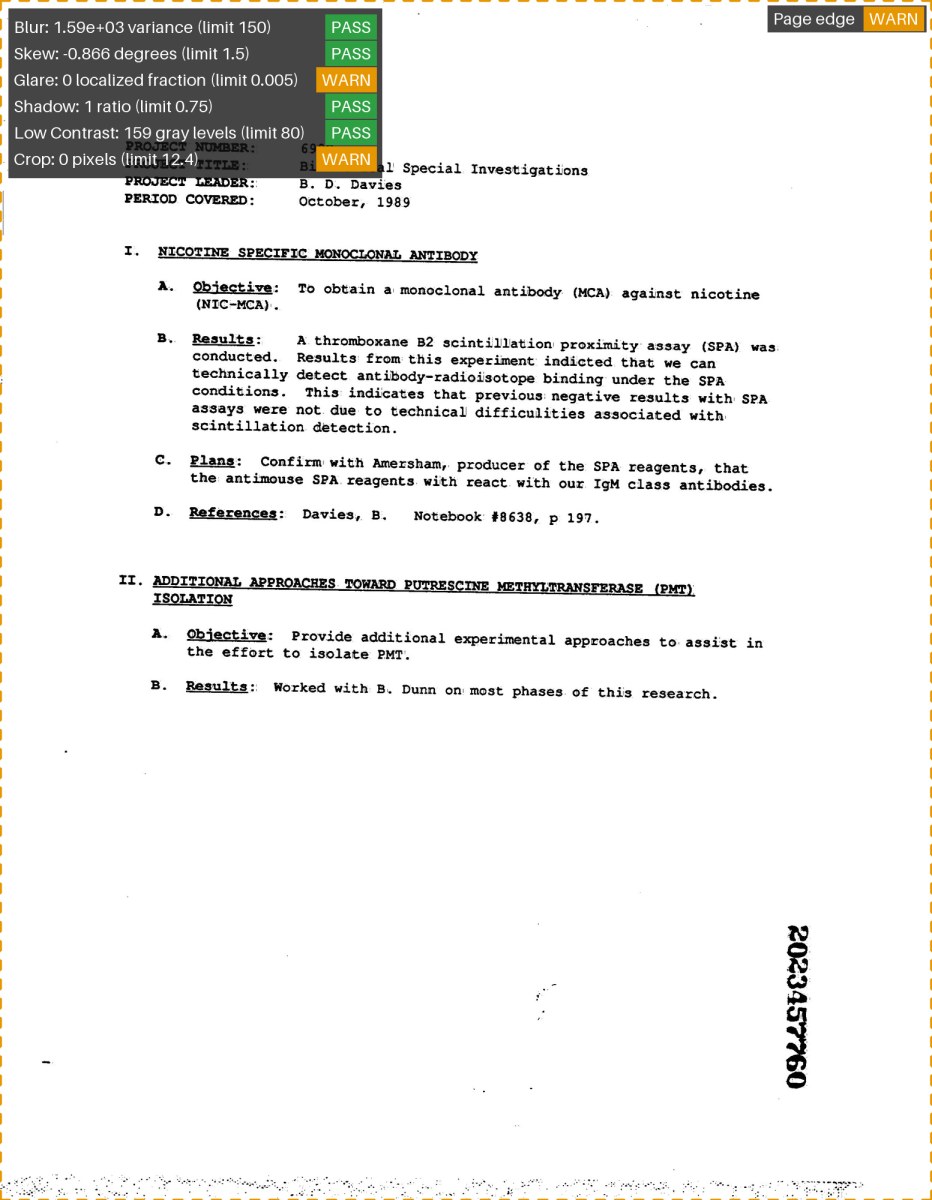
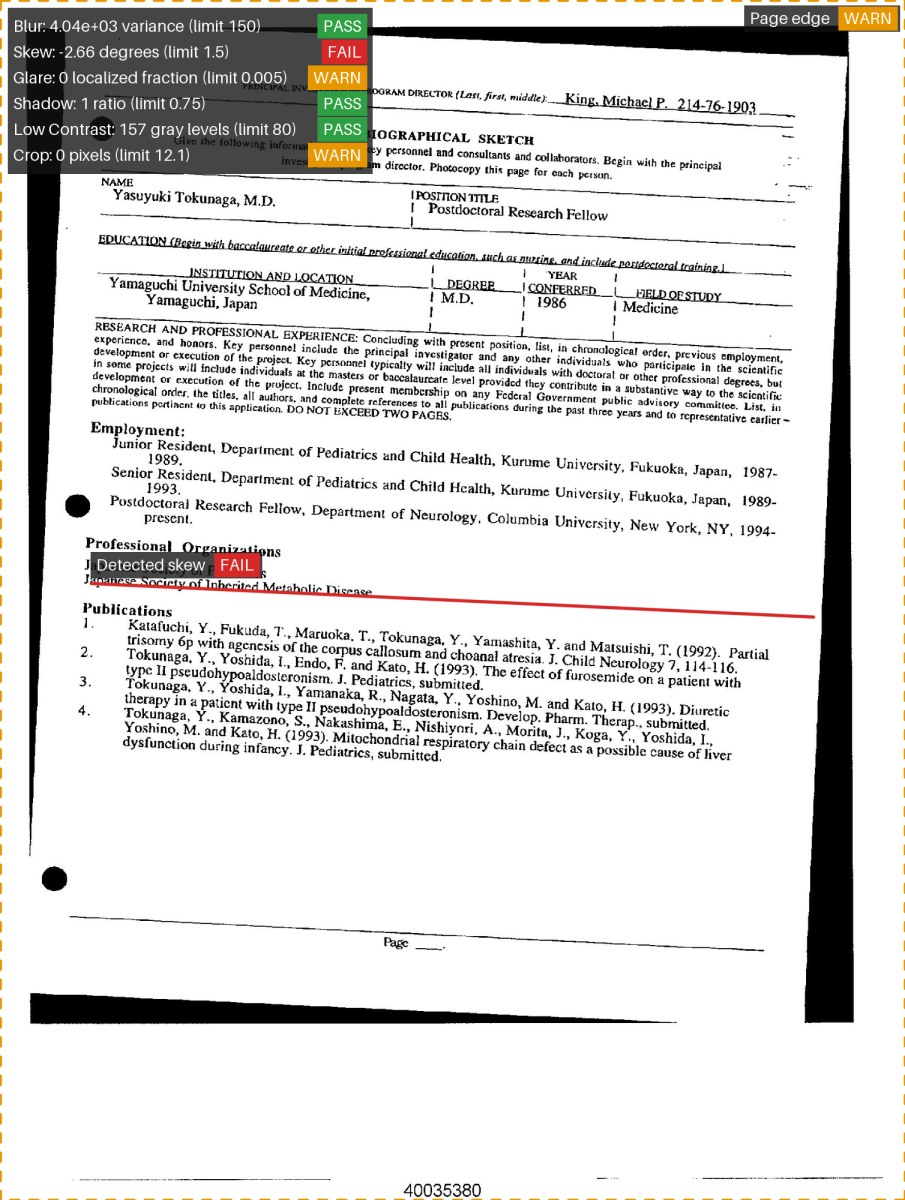
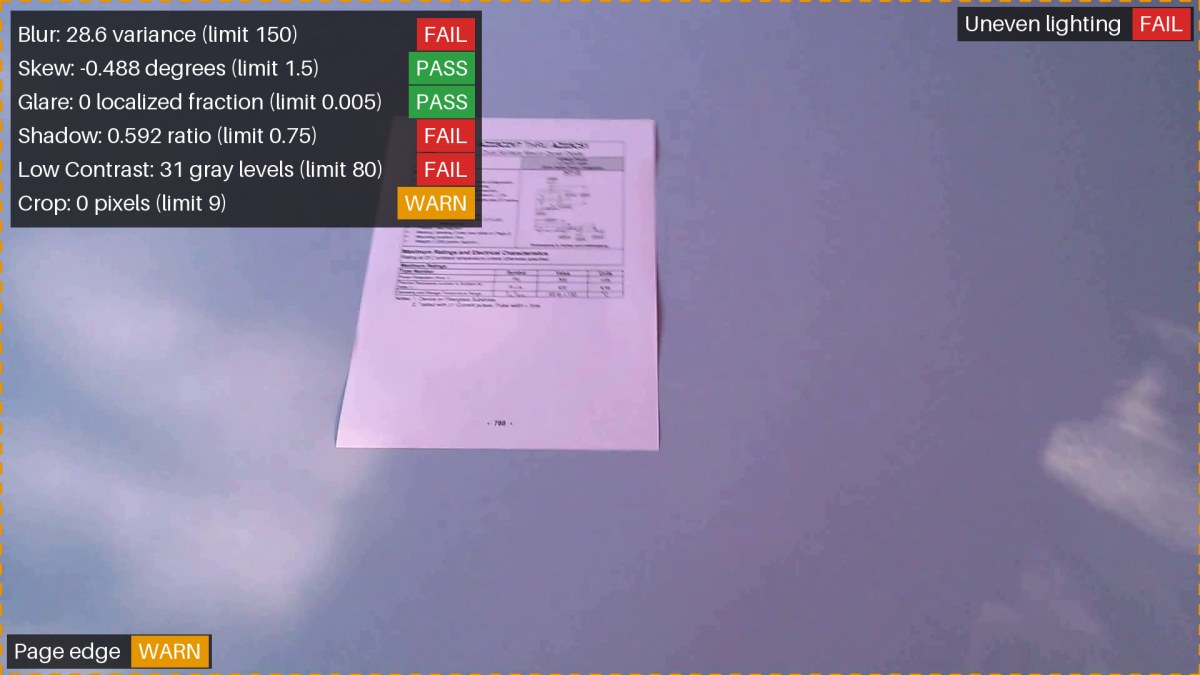
The result opens with a coloured verdict banner. The evidence image outlines what each check measured (green pass, amber warning, red fail; a dashed outline marks the detected page edge) and lists every check with its status. Warnings point at things worth a look but don’t block READY.
The three demos, with their evidence overlays:
Corrections
ScanReady can straighten the page, even out lighting and enhance contrast. Corrections are offered only when every failed check can be fixed. Lighting and contrast corrections are kept only if they actually improve the check they target; otherwise the app skips them and says why. After a correction you get before/after images, a download button for the corrected PNG, the re-check, and a What changed list that flags anything that got worse. Straightening places the page on a larger canvas, so nothing is cropped. The original file is never changed.
Two advisories never change the verdict. A page that looks sideways gets a note and a rotate button. A page that covers under 30% of the image gets a note that it may not be a document, or that you should move closer.
Supported files and limits
- JPEG/JPG, PNG and PDF, identified by file contents.
- Uploads up to 25 MiB; decoded images up to 40 megapixels, with a short side of at least 400 pixels.
- PDFs: first page only, rendered at up to 200 DPI. A corrected PDF page saves as a PNG, never as a modified PDF.
Running it
Download the release zip from the ScanReady 1.0 release on GitHub. Use the attached
thompson_dwight_final_project_submission.zip, not the “Source code” downloads. The code itself is at github.com/mr9t3n/ScanReady. Extract the release zip to a short folder path and run the script for your computer:ScanReady-Windows.bat,ScanReady-macOS.commandorbash ScanReady-Linux.sh. Setup installs a bundled Python environment and opens the browser. You don’t need a separate Python install or administrator access. Stop it with Ctrl+C in the terminal. To uninstall, delete the folder.Evaluation results
Held-out performance, the acceptance bar, and the documented cut line.
Results in brief
- Held-out images: 47 clean public scans (no phone captures)
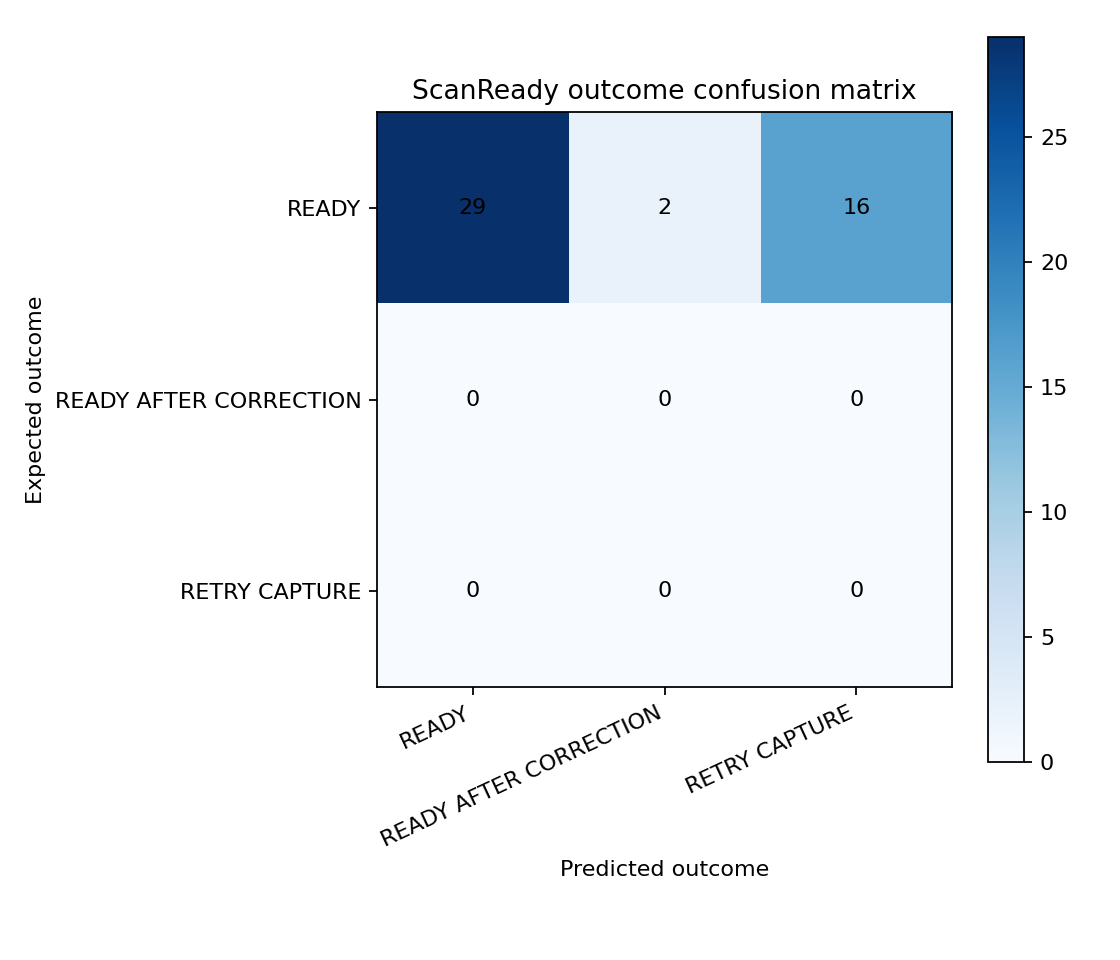
- Recommendation accuracy: 61.7% (29 of 47)
- Slowest analysis: 1.57 seconds
- Deskew accuracy: not measurable (no eligible cases)
Every held-out scan was clean, so the correct answer was READY each time. Sixteen of the eighteen mistakes were Crop false alarms, caused by marks along the scanner’s edge (a known limitation); those scans came back as RETRY CAPTURE. The other two came back as READY AFTER CORRECTION.
The acceptance bar and what happened
The project set itself a bar before evaluation: at least 50 held-out images, at least six real examples of each defect, 80% accuracy, and measured deskew accuracy. Those weren’t met, because the available public scans are clean and contain no labeled defects.
The shortfall was accepted as a documented cut line (decision D9). The held-out data was never changed, and no setting was tuned on held-out results. The app labels the results “Evaluated with disclosed shortfalls” and keeps the full list of unmet requirements visible.
Adding 3,292 more clean scans was considered and declined. They would add no defect examples and wouldn’t change the Crop false-alarm rate.
Calibration
Tuning used 137 separate calibration scans, never the held-out set. Calibration accuracy was 66.4%. No threshold changes were applied automatically; every proposed change needed review and a recorded audit entry.
What a stronger evaluation needs
A fresh, untouched test set with at least six real examples of each defect (blur, a 2–15° tilt, glare, shadow, faint text and cut-off edges) plus clean controls, including phone captures. The 47 current test pages have now been seen, so they can’t be reused as an independent test.
Limitations
Known false alarms, gaps found in testing, and what ScanReady doesn't do.
Known false alarms
The checks use classical OpenCV heuristics and need representative real data to calibrate. Known false positives:
- Scanner-edge marks read as cropped content. This can turn a fixable page into RETRY CAPTURE.
- Mixed-orientation printed content read as page skew.
- Dark copier surrounds distorting paper and shadow estimates.
- Dim but readable captures failing the absolute contrast check.
- Pure-white scans triggering glare warnings, because bright paper and glare can look alike.
- Readable light-coloured text on digital documents (blue headings, grey labels) failing Low Contrast. Contrast enhancement often resolves it.
Gaps found in hands-on testing
- Page orientation isn’t a quality check. A page turned 90° can still be READY; the sideways advisory catches most but not all such pages. An upside-down page can’t be detected without reading the text.
- Dark backgrounds, slides, screenshots and other non-document pictures may be misread, because the page detector looks for a light page.
Out of scope
ScanReady doesn’t do OCR, PDF text extraction, document question answering, RAG, handwriting recognition, semantic classification, restoration of cropped content, whole-PDF analysis, PDF editing, cloud deployment, mobile apps or deep learning.
Future work
A roadmap of unimplemented extensions, each tied to where it would plug in.
Nothing here is implemented. Each item names the place in the current design where it would fit.
Improving the current checks
- Page-orientation check (90°/180°). A sideways page can still be READY. Would fit as a seventh check or an extension of the skew check, plus a rotate correction.
- A crop check that ignores scanner-edge marks. Edge marks cause 16 of the 18 evaluation mistakes. Would fit in the crop check, with paired tests of edge marks versus truly clipped text.
- A contrast check for coloured or grey text. Readable blue or grey text can fail Low Contrast. Would fit in the contrast check, with paired dim-but-readable versus washed-out tests.
- Non-document detection. A slide or screenshot can be mistaken for a page. Would fit in page detection.
- Shadow and copier-surround handling. Dark copier borders distort paper and shadow estimates. Would fit in page detection and the shadow check.
Extending what ScanReady can do
- OCR and PDF text extraction: a text service alongside, not inside, the six quality checks.
- Document question answering and RAG: a document-understanding layer working on extracted text.
- Whole-PDF analysis: a coordinator running the existing single-page pipeline on each page.
- Deep-learning detectors: optional detectors behind the existing report types, once size, licensing and offline costs are justified.
- Cloud deployment and mobile apps: adapters and clients built on a stable pipeline API, keeping local-only as the safe default.
Any of these needs its own approved spec, tests and user-facing disclosure before it could be called supported.
Data and licensing
Where the evaluation and demo images came from, and how provenance was kept.
Rules for the data
- Raw downloads stay local and unchanged. ScanReady works on normalized, metadata-free copies.
- Every source records its title, download URL and date, citation, license, archive hash, and whether redistribution is allowed.
- Images are grouped by source page, so near-duplicates and derived variants stay within one split.
- When a source’s terms were unclear, the images stayed local and only aggregate results were released.
Sources used
- Public archived scans from Kaggle. These make up the calibration and held-out sets and the clean and correctable demos. They were used under the publisher’s MIT declaration, kept verbatim with the release.
- SmartDoc 2015, Challenge 1 (ICDAR 2015 Competition on Smartphone Document Capture and OCR), under CC BY 4.0. A motion-blurred frame is the RETRY CAPTURE demo, with attribution and processing details included.
- Operator phone captures were used during development but kept local-only. They aren’t in the release.
Third-party software
ScanReady uses pypdfium2 4.30.0 to render the first page of PDFs, under Apache-2.0 and BSD-3-Clause terms. The bundled PDFium binary carries its own BSD-style notices. Every platform wheel in the release keeps its license files, and the release builder fails if any are missing.
How it was built
Several AI models, one project, handed off through sprint sheets and progress logs.
ScanReady was the first project built with a model-swapping workflow. Different AI models worked on it in turn. Each picked up where the last left off, working from shared planning files instead of a shared chat history.
The models
- OpenAI Codex models, run through the Codex VS Code extension, wrote the project scaffold and sprint plans, worked through the sprints, and built the first development archive.
- Astra, a GPT-6 model run through the Codex extension, led the September 28 decision review and wrote the decision sprint.
- Claude Code models: Claude Opus 5.5 closed out the development build, ran the UI revisions sprint and the polish pass, and recorded the final release and handoff.
- A local model: Gemma 4 (
gemma4:26b) on a local Ollama instance, served on localhost through a custom CLI and used from VS Code’s chat panel. It worked from the same ledgers until its 32K context window filled, then began to hallucinate.
The handoff system
- One start-here file. A local README opened with “Start here after reconnecting VS Code or opening a new assistant thread”. It always held the current state, the next task and what to read next.
- Sprint sheets as the contract. Each sprint had an objective and numbered acceptance criteria. A box was checked only once evidence existed.
- Progress logs as memory. Every worker added an entry for its task: status, changed files, commands and results, blockers, and the next task. The next model read the latest entry and carried on.
- One standard worker prompt: “Execute the next unchecked task only … checkpoint with exact commands/results and stop after the task.” Any model could take the next step.
- Decisions recorded once. Judgment calls were logged as D1–D9, so later models didn’t reopen settled questions.
- Test-first work. Each change started with a failing test, then the fix. Review findings each got a regression test.
A handoff in practice
On September 28, Codex built and verified the first development archive, then hit a usage limit before it could record its work in the progress log. Claude Opus 5.5 picked it up from the files alone. It re-verified the archive Codex had built, recorded the evidence, and closed out the task. No work was lost, because the logs and the archive itself held the state.
The owner’s role
The project owner made the calls the models couldn’t: license approvals, the evaluation cut line (D9), and hands-on testing of the app and the final archive on Windows and macOS.